
Drag-and-drop image uploads with live preview before posting
Back to products
Photo comments & social proof
Comment Image Boost
Comment Image Boost helps publishers, communities, online stores, directories, and content sites collect photo comments from real readers. Visitors can upload an image while commenting, preview it before submitting, and site owners can moderate every attached image from the comment edit screen or a dedicated moderation queue — turning everyday comment activity into richer, more visual page content.
audityseo.app/comment-image-boost

WordPress plugin
Comment Image Boost
Image alt coverage88%
Comment images indexed1.2k
Content score+34%
Features
Focused controls without a heavy SEO suite.
Publishers, online stores, communities, directories, and content sites that want photo comments from real readers.
Comment-level moderation queue with filters, bulk actions, and orphan cleanup
Lazy-loaded lightbox viewer with automatic EXIF/GPS stripping
Use cases
Built for real WordPress SEO problems.
These examples will become more specific as the product documentation, screenshots, and release details are finalized.
Product pages that thrive on real customer photos
Community forums and directories built on visual proof
Photo contests and campaigns with required image comments
Product tour
A closer look at the plugin.
Real screens from the WordPress admin and the front-end comment experience.
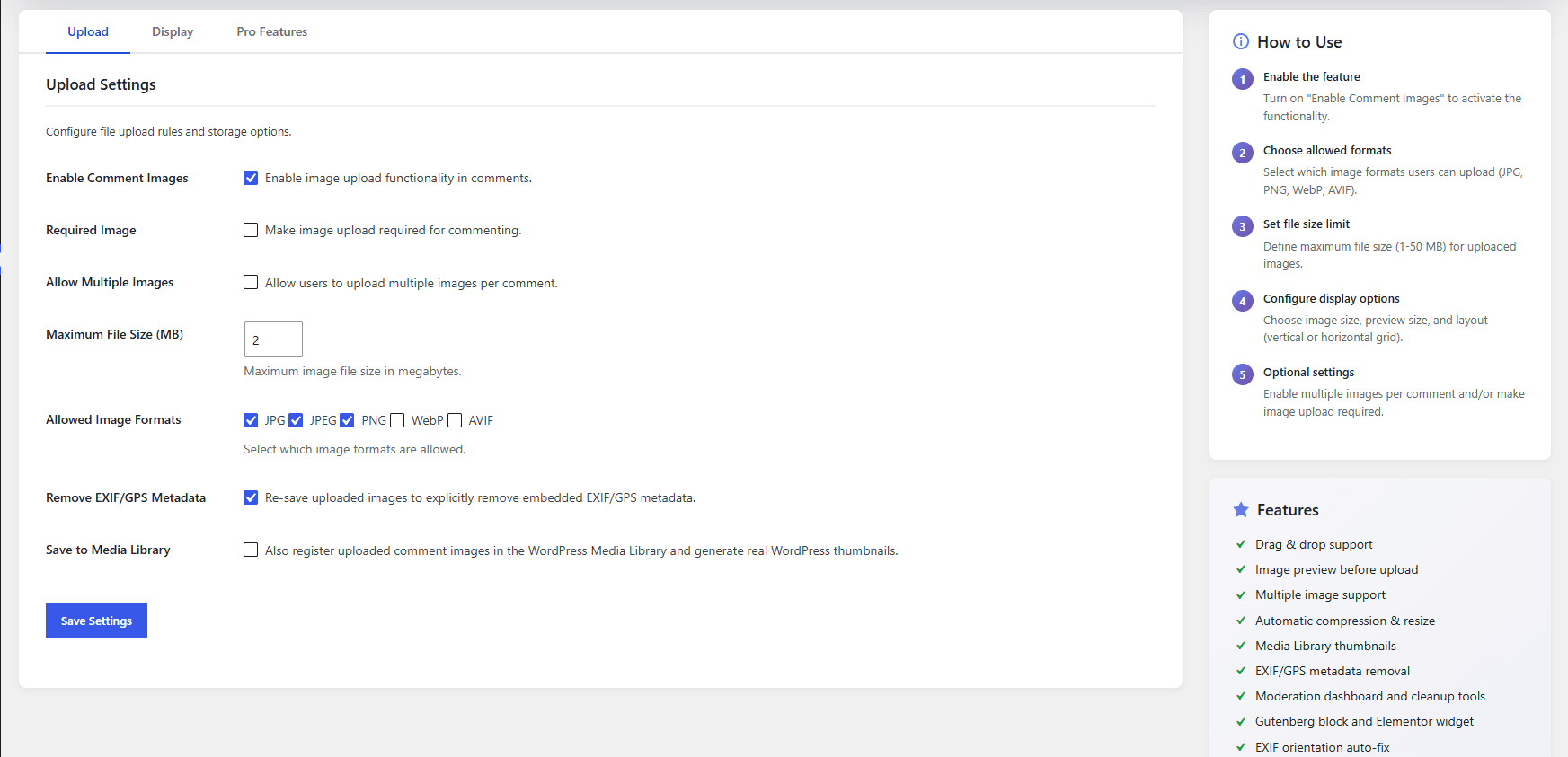
1 / 6
Upload settings — choose allowed formats, size limits, and EXIF/GPS stripping.
Reviews
Loved by real WordPress users.
Rated 5.0 out of 5 by site owners on WordPress.org.
5.0
Based on reviews on WordPress.org
Exactly What We Needed
A great find for anyone looking to add image support to WordPress comments without bloating the site. Setup is straightforward, the upload experience feels native to the platform, and the moderation tools give admins the control they need. No conflicts with our existing plugins, and performance has remained consistent even with heavier traffic. Does what it says on the tin and does it well.
liamjhonnes · June 9, 2026
Reliable and Well-Built Plugin
We've been very happy with this plugin. It adds image uploads to WordPress comments in a clean and user-friendly way. Performance has been solid, the interface is intuitive, and the available moderation features make managing user-submitted images easy. A well-built plugin that does exactly what it promises.
avabrowen · June 2, 2026
Simple, Useful, and Works Great
We've tested several comment image plugins, and this one has been the easiest to set up and manage. It's lightweight, reliable, and does exactly what we were looking for.
noahwillyams · June 1, 2026
Excellent Plugin and Outstanding Support
This plugin solved exactly what we needed for our website. The setup process was quick and straightforward, and everything worked as expected right from the start. The image upload experience is smooth, and the plugin integrates nicely with WordPress. Highly recommended for anyone who wants to allow users to share images in comments.
ethanmaller · May 29, 2026
Pricing
Start free. Upgrade when you need more.
Free covers the core upload and moderation workflow. Pro unlocks galleries, required photo comments, and automatic image optimization.
Free
$0forever
Get started on WordPress.org with the core feature set.
- Single image upload on comment forms, with drag-and-drop support
- Image preview before submission
- JPG, JPEG, and PNG validation up to 2 MB
- Secure uploads via WordPress nonces and wp_handle_upload()
- Custom comment-image upload folder
- Optional Media Library registration with thumbnails
Pro
$30.99/year
Save 35%- Multiple images per comment, with captions
- Required image comments for campaigns and contests
- WebP and AVIF uploads with higher upload limits
- Horizontal comment image layout
- Global image gallery shortcodes, Gutenberg block, and Elementor widget
- Gallery columns and carousel layout with navigation arrows
- Post type and category targeting
- Automatic resize, compression, and progressive JPEG/PNG output